<?xml version="1.0" encoding="utf-8"?><feed xmlns="http://www.w3.org/2005/Atom" ><generator uri="https://jekyllrb.com/" version="3.10.0">Jekyll</generator><link href="https://fbedussi.github.io/blog//feed.xml" rel="self" type="application/atom+xml" /><link href="https://fbedussi.github.io/blog//" rel="alternate" type="text/html" /><updated>2026-11-15T21:16:41+00:00</updated><id>https://fbedussi.github.io/blog//feed.xml</id><title type="html">No stress front end</title><subtitle>A journey to a healthier front end development</subtitle><author><name>Francesco Bedussi</name><email>francesco [at] francescobedussi.it</email></author><entry><title type="html">Coding Fast vs. Building Wisely: Using AI Across the Project Lifecycle</title><link href="https://fbedussi.github.io/blog//opinions/Coding-Fast-vs-Building-Wisely-Using-AI-Across-the-Project-Lifecycle" rel="alternate" type="text/html" title="Coding Fast vs. Building Wisely: Using AI Across the Project Lifecycle" /><published>2026-11-14T00:00:00+00:00</published><updated>2026-11-14T00:00:00+00:00</updated><id>https://fbedussi.github.io/blog//opinions/Coding%20Fast%20vs%20Building%20Wisely:%20Using%20AI%20Across%20the%20Project%20Lifecycle</id><content type="html" xml:base="https://fbedussi.github.io/blog//opinions/Coding-Fast-vs-Building-Wisely-Using-AI-Across-the-Project-Lifecycle"><![CDATA[<p>All the recent hype on AI has been around boosting productivity, meaning the amount of code written in a unit of time. Beside the fact that it is questionable if this is the kind of productivity that really matters, productivity is not always what you may want to improve. What you need to improve depends a lot on the phase the project is in its lifecycle.</p>

<!--more-->

<h2 id="what-is-the-top-priority-for-a-start-up-project">What is the top priority for a start up project?</h2>

<p>I’m talking about projects and not companies here because there are start up projects even in mature companies. A start up project is a project that is just born. It has some distinctive features. First of all it still has to prove that there is room for it in the real world. That it serves a real need, that it can payout for itself. Second, there are still a lot of things to be discovered, to be defined. In both of these cases speed is the key factor. The project needs fast feedback loops to have a better understanding of the environment and its relations to it. It needs fast time to market to quickly build a market share before some competitor does and to reach the break even point before the money and/or the patience of the funders run out.
In this case delegating entire features to the AI can make sense, if (and is a big if, we will see it later on) that means releasing them faster. Sure there will be bugs, but they would have happened even if the code were rushed out manually. Sure you will lose some knowledge in how the system works, but this is all technical debt that may be worth taking to reach the main goal: release fast, learn fast, succeed fast (or die).
There are plenty of blog and social media posts out there describing how to set up a swarm of agents that will work for you, so I’m not going to spend many words on this topic. Let’s look at a different situation, instead.</p>

<h2 id="what-is-the-top-priority-of-a-mature-project">What is the top priority of a mature project?</h2>

<p>A mature project is different. Speed is not the number one priority. Stability is. A colleague of mine once said: “Look, the system is already running, it is making a lot of money every hour. Every time you do something on it, there is a chance you will break it, and the company will lose money. So, the less you work, the more money the company makes”.<br />
Is there any room for AI in this kind of project or should you carefully chisel your code manually like a goldsmith, like in the good ol’ days? Sure there is! You can use AI to improve the stability.<br />
Stability can be improved in different ways. The most obvious one is fixing bugs. But to fix a bug without introducing another one you must have a deep understanding of the ins and outs of the system. More frequently than not in mature projects, this kind of knowledge got lost along the way. People have come and gone, changes have piled up, and now nobody knows exactly how things work, or even how they should work. So, rebuilding knowledge is another way to improve stability. <br />
Beside the need to keep the system up and running as is, usually there is also the need to evolve the system, even if at a much lower pace than in the start up phase. To be able to do that you need to start paying off the technical debt that had accumulated in the start up phase. By definition the technical debt is what makes it harder, or even impossible, to work on the system at a reasonable speed and without breaking things. Exchanging technical debt for speed has been the right thing to do in the start up phase, and it is also thanks to that trade off if the project has succeeded, but now it is time to pay it off, if you don’t want the system to become unmanageable.<br />
AI can help a lot with all these activities.</p>

<h3 id="write-the-code-but-let-the-ai-review-it">Write the code, but let the AI review it</h3>

<p>They say that the best way to predict the future is by contributing to shaping it. In the same way, the best way to understand a software system is contributing in writing it. In a mature project you don’t need to rush features out, you need to double check that what you are doing fits in the system, you are not introducing any regressions and maybe you are even improving things a bit, applying the boy scout rule. Sure you can let the AI write the code and then review it, but it is very difficult to understand if a piece of code is the best possible way to solve a problem in a given scenario without putting your mind to the problem solving first. And once you have spent time on problem solving, then writing the code is trivial. Personally, writing code helps me to reason about a problem, so I prefer to do it manually. But then you can use the AI to double check that you didn’t make any local error in the new code, and that it doesn’t break some other part of the code base. In my experience the AI is much more capable than humans in catching errors that are not evident looking just at the new code, but that depend on how the new code interacts with the old one. On the other hand humans are better than the AI in judging if the new code has a reason to exist in the first place or not. So AI reviews do not replace human review completely, they are just faster and better in catching some subtle issues.</p>

<h3 id="reverse-engineering-the-system">Reverse engineering the system</h3>

<p>The AI can help to unfold complex legacy code bases, to rebuild the knowledge on how things work that got lost along the way. Even in this case the best way to proceed is to try to navigate and understand the codebase on your own first, and then double check with the AI if your understanding matches its one, in that case it is probably correct. The AI cannot understand the system for you, in the end you need to build a mental model of the system on your own, but it can help in getting you unstuck and in double checking your assumptions and your hypothesis. It can also help in explaining snippets of code, when they are written in a language you are not familiar with.</p>

<h3 id="delegate-mechanical-housekeeping-activities">Delegate mechanical housekeeping activities</h3>

<p>There are a lot of refactors, reworks, housekeeping activities in general that are too fuzzy and complex for traditional automation, like the IDE rework features, and are too long to do manually, compared to the value they add. Replacing or removing an outdated library, updating to a new version of the same language, porting from a language that the team does not master to a one that the team is more confident with. These are all activities that do not bring direct business value, but that can be a precondition to be able to work effectively on the system. These sorts of things can be effectively delegated to AI, provided that you have a no regression test suite that you can trust.</p>

<h3 id="write-no-regression-tests">Write no regression tests</h3>

<p>Speaking of tests, they are another of those activities that everybody is always willing to do, but strangely enough there is never time to do them. The problem is that a no regression test does not add any business value per se, so it’s difficult to convince the management to invest in them. But it is an enabler for faster and even automatic development cycles, so it would really be nice to have, if only we had time! The AI can help make writing tests quick enough to slip them in between “real” work. Even in this case I prefer a mix of human and AI. I delegate to the AI almost all the boilerplate necessary to set up the test environment in the way I like. Then I manually write the tests covering the most important flows, then I ask the AI to double chek and extend them to cover corner cases.</p>

<h3 id="ask-the-ai-for-alternatives">Ask the AI for alternatives</h3>

<p>There are always multiple ways to skin a cat, and on mature projects it is always worth taking some time to evaluate possible alternatives to solve a problem or to implement a feature. On the one hand there is the time to do it, on the other there is a high risk of introducing regressions, so you must be more careful than in a green field project. AI is a good partner to brainstorm with to quest for new ideas. It is always available, never tired, never judging and always eager to say something.</p>

<h2 id="is-improving-productivity-in-writing-code-improving-the-overall-productivity">Is improving productivity in writing code improving the overall productivity?</h2>

<p><em>The Goal</em>, the famous book by Goldratt that introduced the theory of constraints, makes it clear that increasing the productivity of just one step in a production pipeline does not automatically increase the productivity of the overall process. If you increase the productivity of a non bottleneck step, the overall productivity remains unchanged, because it is controlled by the bottleneck step(s). So, is writing code the real bottleneck step in a software production pipeline? Let’s try to understand. First of all, what are the steps in a software production pipeline? They can vary, but more or less should be:</p>

<ol>
  <li>requiremets gathering</li>
  <li>design the architecture</li>
  <li>split the activity in tasks, estimate and plan</li>
  <li>code</li>
  <li>test</li>
  <li>release</li>
</ol>

<p>The first step cannot be delegated to the AI because it requires interacting with other people. And in my experience it can take a lot of time. <br />
Steps 2 and 3 can be delegated but at the risk of progressively losing the mental model on how the system works. This is very dangerous because it severely reduces your ability to maintain and change the system in the future. It can be an acceptable risk sometimes in a start up project, definitely not in a mature one. <br />
Step 4, coding, can be delegated to AI, as well as point 5, testing. But if you are still testing manually then producing code at the speed of light is useless, because the bottleneck will be manual testing, so all you will get is to increase the pile of code waiting to be tested.<br />
The last step, release, can already be sort of automated if you practice continuous delivery, but if you don’t, it may really be a bottleneck. If you release once every 6 months (it happened to me), then coding faster does not mean release faster. It could mean release more, but it depends if the other steps can keep up.
So I don’t have a one size fits all answer, it depends on your use case, but before trying to speed up the coding step, be sure that it is your real bottleneck.</p>

<h2 id="conclusion">Conclusion</h2>

<p>So, in the end, unless there are compelling business constraints to release features at a breakneck speed, even at the risk of making the system unstable and accumulating tech debt, it’s probably more sensible to use the AI to make the code more robust and the system more stable. Because a well maintained system, a system where complexity hasn’t gone out of hand, a system the team truly knows and understands is also a system where new features can be introduced pretty fast and pretty safely, even manually.</p>]]></content><author><name>Francesco Bedussi</name><email>francesco [at] francescobedussi.it</email></author><category term="Opinions" /><summary type="html"><![CDATA[All the recent hype on AI has been around boosting productivity, meaning the amount of code written in a unit of time. Beside the fact that it is questionable if this is the kind of productivity that really matters, productivity is not always what you may want to improve. What you need to improve depends a lot on the phase the project is in its lifecycle.]]></summary></entry><entry><title type="html">My De-Googling Experiment: Life on CalyxOS</title><link href="https://fbedussi.github.io/blog//experiments/My-De-Googling-Experiment-Life-on-CalyxOS" rel="alternate" type="text/html" title="My De-Googling Experiment: Life on CalyxOS" /><published>2026-09-14T00:00:00+00:00</published><updated>2026-09-14T00:00:00+00:00</updated><id>https://fbedussi.github.io/blog//experiments/My%20De-Googling%20Experiment:%20Life%20on%20CalyxOS</id><content type="html" xml:base="https://fbedussi.github.io/blog//experiments/My-De-Googling-Experiment-Life-on-CalyxOS"><![CDATA[<p>Ok, this is not a front-end topic, but I think it may be interesting to share anyway. In the last week, I worked on setting up a de-Googled phone. Is it easy? Is it hard? Do you need to become a kind of digital monk? Let’s find out.</p>

<!--more-->

<h2 id="why-de-google-in-the-first-place">Why De-Google in the First Place?</h2>

<p>You may want to de-Googled for many valid reasons: privacy concerns, technical curiosity, and a basic rule of common sense: <strong>don’t put all your eggs in one basket</strong>. Entrusting your entire digital life to a single provider creates a dangerous single point of failure. If your account gets flagged or blocked for any reason, you effectively lose access to your primary device and identity.</p>

<h2 id="the-de-googling-spectrum-4-levels-of-detachment">The De-Googling Spectrum: 4 Levels of Detachment</h2>

<p>De-Googling is not an all-or-nothing choice. It exists on a continuum:</p>

<ol>
  <li><strong>Level 1 (Easy):</strong> Stop using Google Search. Swapping it for privacy-centric engines (like DuckDuckGo) is trivial; I did it years ago and never missed it.</li>
  <li><strong>Level 2 (Moderate):</strong> Replace individual Google apps with alternatives, possibly open source. This is relatively straightforward for most apps. The only one I couldn’t replace entirely is Google Maps. There are many navigation apps, but none gives you satellite view, live traffic, public transport info, store hours, reviews, and photos that help you plan your trip.</li>
  <li><strong>Level 3 (Advanced):</strong> Remove the system-level Google account from your device. You eliminate deep telemetry while using open-source emulation wrappers to keep crucial everyday apps (banking, messaging, digital IDs) working.</li>
  <li><strong>Level 4 (Hardcore):</strong> Completely cut out Google infrastructure, even indirectly. No microG, no Play Services proxies. This significantly alters the modern smartphone experience.</li>
</ol>

<h2 id="my-setup-calyxos-on-a-refurbished-pixel-7a">My Setup: CalyxOS on a Refurbished Pixel 7a</h2>

<p>I am currently sitting at <strong>Level 3</strong>. Following a conversation with Gemini, I learned that installing <strong>CalyxOS</strong> on a Google Pixel device was the cleanest route. Paradoxically, Pixel hardware by Google is among the easiest to de-Google because it allows seamless unlocking and re-locking of the bootloader.</p>

<p>I picked up a used Pixel 7a on eBay for €140. The installation process took about an hour directly from the browser and went smoothly overall. Once booted, you get a clean device completely disconnected from Google. Essentially, it is a mini PC that makes calls and browses the web. Unfortunately, the modern mobile experience is not just that.</p>

<h2 id="the-two-core-challenges-of-level-3">The Two Core Challenges of Level 3</h2>

<p>To make a de-Googled phone viable as a primary driver, you must solve two major hurdles:</p>

<h3 id="1-app-sourcing">1. App Sourcing</h3>
<p>F-Droid is fantastic for open-source utilities (like AntennaPod or OpenVPN), but it lacks proprietary essentials like banking apps, WhatsApp, or local car-sharing. To solve this, CalyxOS bundles <strong>Aurora Store</strong>, an open-source client that lets you anonymously download apps directly from the Google Play Store without logging into a Google account. This sounds a little like cheating to me, because, in the end, we are still using a Google service, even if anonymously. Another alternative is to download and install APKs directly, but it is less handy and more risky. This time, I didn’t want to overcomplicate things, so I accepted the compromise and used the Aurora Store. Another option is to replace native apps with web apps and PWAs. I did that for many utility apps, and it worked like a charm.</p>

<p>Side technical note: at least on Android, there is very little a native app can do that a PWA cannot do. IMHO, PWAs are technically superior to native apps: they are smaller, safer (because they are sandboxed by the browser), and easier to distribute.</p>

<h3 id="2-google-play-services-emulation">2. Google Play Services Emulation</h3>
<p>Many critical apps, like banks and digital IDs, rely on low-level Play Services APIs for integrity checks and push notifications. CalyxOS integrates <strong>microG</strong>, an open-source re-implementation of core Play Services. In my testing, microG has handled almost everything flawlessly.</p>

<h2 id="real-world-friction-points--edge-cases">Real-World Friction Points &amp; Edge Cases</h2>

<ul>
  <li><strong>WhatsApp:</strong> Transitioning WhatsApp remains a headache. Because chat backups are local, moving them requires careful sequencing. I am currently running WhatsApp in <em>Companion Mode</em> because SMS activation failed on the main device (likely due to missing permissions initially, which triggered a rate-limit lock).</li>
  <li><strong>Contact &amp; Calendar Sync:</strong> Replaced Google Sync with CalDAV/CardDAV hosted on my private server.</li>
  <li><strong>Cloud Storage &amp; Photos:</strong> Replaced Google Drive and Photos with <strong>pCloud</strong> (a Swiss cloud provider with great cross-platform support) combined with automated backups to my home QNAP NAS over VPN.</li>
  <li><strong>NFC Payments:</strong> Google Pay does not work without native Play Services. While paying with a physical card isn’t a huge drawback, it is one fewer convenience.</li>
  <li><strong>Android Auto:</strong> Android Auto is heavily tied to Google’s proprietary ecosystem. To make it work, I had to install Android Auto, Google Maps, the Google app, and Google Text-to-Speech via Aurora Store. Once launched, alternative turn-by-turn navigation apps like Magic Earth can take over, but Android Auto itself remains tethered to Google binaries.</li>
</ul>

<h2 id="complete-application-compatibility-matrix">Complete Application Compatibility Matrix</h2>

<table>
  <thead>
    <tr>
      <th style="text-align: left">App / Service</th>
      <th style="text-align: left">Source / Method</th>
      <th style="text-align: left">Status &amp; Notes</th>
    </tr>
  </thead>
  <tbody>
    <tr>
      <td style="text-align: left"><strong>Banking (Fineco, WeBank)</strong></td>
      <td style="text-align: left">Aurora Store</td>
      <td style="text-align: left"><strong>Working</strong> — Fully functional via microG</td>
    </tr>
    <tr>
      <td style="text-align: left"><strong>Digital ID (CieID, IO)</strong></td>
      <td style="text-align: left">Aurora Store</td>
      <td style="text-align: left"><strong>Working</strong> — Level 3 NFC card reading works</td>
    </tr>
    <tr>
      <td style="text-align: left"><strong>WhatsApp</strong></td>
      <td style="text-align: left">Aurora Store / APK</td>
      <td style="text-align: left"><strong>Partial</strong> — Running in Companion Mode; primary SMS activation rate-limited</td>
    </tr>
    <tr>
      <td style="text-align: left"><strong>Google Drive / Photos</strong></td>
      <td style="text-align: left">Replaced</td>
      <td style="text-align: left"><strong>Replaced</strong> — Migrated to pCloud &amp; local NAS via VPN</td>
    </tr>
    <tr>
      <td style="text-align: left"><strong>Authentication (Authy)</strong></td>
      <td style="text-align: left">F-Droid</td>
      <td style="text-align: left"><strong>Replaced</strong> — Switched to open-source Ente Auth</td>
    </tr>
    <tr>
      <td style="text-align: left"><strong>Weather App</strong></td>
      <td style="text-align: left">F-Droid</td>
      <td style="text-align: left"><strong>Replaced</strong> — Switched to Breezy Weather</td>
    </tr>
    <tr>
      <td style="text-align: left"><strong>Web Services (IKEA, Gemini, Post)</strong></td>
      <td style="text-align: left">Browser</td>
      <td style="text-align: left"><strong>PWA</strong> — Running smoothly as Progressive Web Apps</td>
    </tr>
    <tr>
      <td style="text-align: left"><strong>Podcasts &amp; Radio</strong></td>
      <td style="text-align: left">F-Droid</td>
      <td style="text-align: left"><strong>Replaced</strong> — AntennaPod &amp; RadioDroid</td>
    </tr>
    <tr>
      <td style="text-align: left"><strong>Google Maps &amp; Camera</strong></td>
      <td style="text-align: left">Aurora Store</td>
      <td style="text-align: left"><strong>Working</strong> — Pixel Camera works great; G-Maps logged in via microG</td>
    </tr>
    <tr>
      <td style="text-align: left"><strong>Misc Utilities</strong></td>
      <td style="text-align: left">Aurora / F-Droid</td>
      <td style="text-align: left"><strong>Working</strong> — Satispay, Telegram, Spotify, KeePass, OpenVPN all work</td>
    </tr>
  </tbody>
</table>

<h2 id="final-thoughts">Final Thoughts</h2>

<p>Stepping into Level 3 gives you an experience that is almost functionally equivalent to standard Android, with one notable exception: credit/debit card virtualization. It also breaks the direct leash Google holds over your operating system. Going all the way to Level 4 (zero Google dependencies) feels hardcore and would require sacrificing too much modern digital convenience. But who knows, maybe it will be my next step.</p>

<p>However, this experiment highlights how thoroughly wrapped we are in a “digital Matrix”. It is so convenient and functional that it is hard to leave. For now, CalyxOS on a Pixel offers a pragmatic middle ground between privacy and isolation.</p>]]></content><author><name>Francesco Bedussi</name><email>francesco [at] francescobedussi.it</email></author><category term="Experiments" /><summary type="html"><![CDATA[Ok, this is not a front-end topic, but I think it may be interesting to share anyway. In the last week, I worked on setting up a de-Googled phone. Is it easy? Is it hard? Do you need to become a kind of digital monk? Let’s find out.]]></summary></entry><entry><title type="html">Elm vs React in a real life scenario</title><link href="https://fbedussi.github.io/blog//experiments/Elm-vs-React-in-a-real-life-scenario" rel="alternate" type="text/html" title="Elm vs React in a real life scenario" /><published>2026-01-12T00:00:00+00:00</published><updated>2026-01-12T00:00:00+00:00</updated><id>https://fbedussi.github.io/blog//experiments/Elm%20vs%20React%20in%20a%20real%20life%20scenario</id><content type="html" xml:base="https://fbedussi.github.io/blog//experiments/Elm-vs-React-in-a-real-life-scenario"><![CDATA[<p>I discovered Elm around 2016, and I immediately fell in love with it. At the time I was working on a fairly complex e-commerce website using jQuery and a custom front-end framework using a pub/sub architecture. Our code was a mess: there was a lot of repetition, bugs seemed to reproduce overnight, and there was always a new one. It was very difficult to orchestrate the different parts of the UI. Given this state of things, Elm was a welcome ray of light. The type system, the compiler, the one-way data flow architecture—they all could have helped solve the pain points we were suffering from. I tried to push for its use in the company, but without success. After a couple of years, I switched companies and tech stacks. Now I was working full-time on React projects. I tried to push Elm even in my new workplace, but the result was the same: nobody was interested.</p>

<p>Then years passed. I worked more and more on React, and since I couldn’t use Elm, I tried to port some of its principles to React: the type system with TypeScript, the one-way data flow with Redux, and the functional paradigm, trying to embrace the functional side of JavaScript.</p>

<p>Fast forward to 2024, I switched companies once more. Now I was working full-time on Elm—hooray! But the thing is that in those 10 years or so, the JS-based ecosystem had evolved a lot, while Elm had not. A lot of the issues we used to have using jQuery to write imperative spaghetti code were solved by the plethora of declarative and reactive front-end frameworks that had emerged. The lack of static types was patched by TypeScript, and, man, TypeScript is not perfect, but its duck typing approach hits a sweet spot between safety and flexibility, and its type system is really powerful. Finally, some nice functional utilities were added to JavaScript, such as <code class="language-plaintext highlighter-rouge">map</code>, <code class="language-plaintext highlighter-rouge">filter</code>, and so on.</p>

<p>On the other hand, Elm continued to suffer from the same pain points: it lacks support for a lot of (and ever-increasing) browser APIs, it doesn’t allow interactive debugging (and this really hurts when you have to troubleshoot a weird bug in production), and it has very limited options to handle CSS. It makes it very difficult to do some trivial things, like getting a timestamp or a random number. On top of that, it is very difficult to find people who are proficient in it, or even willing to learn it. Like it or not, it has been rejected by the front-end community.</p>

<p>So in the end, our team decided that it was better to replace Elm with React (+ TypeScript). And we are doing it. One of the things that worried me was the size of the final bundle. Elm is famous for producing small assets, while React is notoriously quite heavy.</p>

<p>Here are the results of this experiment.</p>

<!--more-->

<h1 id="first-step-11-porting">First step: 1:1 porting</h1>

<p>To simplify the migration, reduce the risk of bugs, and simplify the alignment of the Elm and React codebases while they are both in use, I opted for a 1:1 port: I converted every Elm file into an equivalent React file, keeping the same architecture using Redux. I used Redux Toolkit to reduce the boilerplate code.</p>

<p>The result in terms of bundle size for this first version of the port is as follows:</p>

<ul>
  <li>Elm: 591 KB</li>
  <li>React+Redux Toolkit: 834 KB</li>
</ul>

<p>So at first glance, the theory that Elm-produced assets are smaller than those produced by React is confirmed (in this case, 41% smaller). But the story doesn’t end there. First of all, the difference in gzipped files is drastically reduced:</p>

<ul>
  <li>Elm: 183 KB</li>
  <li>React+Redux Toolkit: 204 KB</li>
</ul>

<p>We’re talking about 11%, a sign that Elm’s output is indeed very optimized, so it compresses less than React’s.</p>

<p>Then, being back in JSLand, I finally have access to tools that didn’t work with Elm. For example, <a href="https://www.npmjs.com/package/webpack-bundle-analyzer">Webpack’s Bundle Analyzer</a>. Looking inside the bundle, I could see that the libraries have the following sizes:</p>

<ul>
  <li>React 195 KB</li>
  <li>Redux + React-Redux + Redux Toolkit + Immer + Reselect: 102 KB</li>
  <li>The company Design System 229 KB</li>
  <li>LaunchDarkly SDK (external service to manage feature flags) 38 KB</li>
</ul>

<p>From this we can deduce that the actual code takes 270 KB, so it doesn’t offer much room for optimization.</p>

<p>One of the heaviest parts is, as I feared, React. But, hey, we are in JSLand here, we have options. Plenty of them, actually. So let’s try to replace React with Preact.</p>

<h1 id="second-step-replace-react-with-preact">Second step: replace React with Preact</h1>

<p>This replacement should be fine in this case, since we are talking about a micro front-end, with no server-side rendering and no use of advanced react-only features.</p>

<p>The replacement was straightforward, just a couple of lines in the <code class="language-plaintext highlighter-rouge">tsconfig.json</code> file, and it brought the bundle size down to 661KB, so only 70KB more than Elm, but with the surprise that in the gzipped files the values are reversed:</p>

<ul>
  <li>Preact 155 KB (gzipped)</li>
  <li>Elm 187 KB (gzipped)</li>
</ul>

<p>So even at this point I struggle to say that Elm provides a real advantage in terms of bundle size. But we have not finished yet. We can try to replace the entire cumbersome Redux machinery with the leaner Zustand, which should further lower the values.</p>

<h1 id="third-step-replace-redux-toolkit-with-zustand">Third step: replace Redux Toolkit with Zustand</h1>

<p>Zustand can support a pattern very similar to Redux Toolkit, so the replacement took little effort. Unfortunately, in the process I had to add <code class="language-plaintext highlighter-rouge">Dayjs</code>, a library to handle dates. I tried to do without it, but JavaScript’s native <code class="language-plaintext highlighter-rouge">Date</code> is notoriously flawed and was causing a bug.</p>

<p>So, all considered, the new bundle sizes are:</p>

<ul>
  <li>629 KB (vs 590 KB Elm version)</li>
  <li>gZipped: 147 KB (vs 182 KB Elm version)</li>
</ul>

<p>So it’s hard to say which one is the best—I would call it a draw.</p>

<h1 id="fourth-step-simplify-the-code">Fourth step: simplify the code</h1>

<p>Now I have a last step to take: write the React code in a more idiomatic way. This should remove some layers of indirection and trim some more KBs from the bundle. But I don’t expect miracles here, and I won’t be able to do that until the rollout of the React version is completed.</p>

<h1 id="conclusions">Conclusions</h1>

<p>I think this experiment is interesting because it is about a real-life scenario and application, and it doesn’t happen often that you have the chance to write the exact same application in Elm and React and be able to compare the output.</p>

<p>The results, while confirming that Elm produces really small assets, also indicate that the gap can be practically eliminated, so this should definitely be a point of attention but not a showstopper in the decision process of migrating from Elm to React.</p>]]></content><author><name>Francesco Bedussi</name><email>francesco [at] francescobedussi.it</email></author><category term="Experiments" /><summary type="html"><![CDATA[I discovered Elm around 2016, and I immediately fell in love with it. At the time I was working on a fairly complex e-commerce website using jQuery and a custom front-end framework using a pub/sub architecture. Our code was a mess: there was a lot of repetition, bugs seemed to reproduce overnight, and there was always a new one. It was very difficult to orchestrate the different parts of the UI. Given this state of things, Elm was a welcome ray of light. The type system, the compiler, the one-way data flow architecture—they all could have helped solve the pain points we were suffering from. I tried to push for its use in the company, but without success. After a couple of years, I switched companies and tech stacks. Now I was working full-time on React projects. I tried to push Elm even in my new workplace, but the result was the same: nobody was interested. Then years passed. I worked more and more on React, and since I couldn’t use Elm, I tried to port some of its principles to React: the type system with TypeScript, the one-way data flow with Redux, and the functional paradigm, trying to embrace the functional side of JavaScript. Fast forward to 2024, I switched companies once more. Now I was working full-time on Elm—hooray! But the thing is that in those 10 years or so, the JS-based ecosystem had evolved a lot, while Elm had not. A lot of the issues we used to have using jQuery to write imperative spaghetti code were solved by the plethora of declarative and reactive front-end frameworks that had emerged. The lack of static types was patched by TypeScript, and, man, TypeScript is not perfect, but its duck typing approach hits a sweet spot between safety and flexibility, and its type system is really powerful. Finally, some nice functional utilities were added to JavaScript, such as map, filter, and so on. On the other hand, Elm continued to suffer from the same pain points: it lacks support for a lot of (and ever-increasing) browser APIs, it doesn’t allow interactive debugging (and this really hurts when you have to troubleshoot a weird bug in production), and it has very limited options to handle CSS. It makes it very difficult to do some trivial things, like getting a timestamp or a random number. On top of that, it is very difficult to find people who are proficient in it, or even willing to learn it. Like it or not, it has been rejected by the front-end community. So in the end, our team decided that it was better to replace Elm with React (+ TypeScript). And we are doing it. One of the things that worried me was the size of the final bundle. Elm is famous for producing small assets, while React is notoriously quite heavy. Here are the results of this experiment.]]></summary></entry><entry><title type="html">Switch cases exhaustive check in TypeScript like Elm does</title><link href="https://fbedussi.github.io/blog//tips/switch-exhaustive-checker" rel="alternate" type="text/html" title="Switch cases exhaustive check in TypeScript like Elm does" /><published>2025-11-06T00:00:00+00:00</published><updated>2025-11-06T00:00:00+00:00</updated><id>https://fbedussi.github.io/blog//tips/switch%20exhaustive%20checker</id><content type="html" xml:base="https://fbedussi.github.io/blog//tips/switch-exhaustive-checker"><![CDATA[<p>One of the strong guarantees Elm offers is the exhaustive check that makes it impossible to forget to handle a possible branch in a <code class="language-plaintext highlighter-rouge">case</code> statement.</p>

<p>For instance, here:</p>

<div class="language-elm highlighter-rouge"><div class="highlight"><pre class="highlight"><code><span class="k">type</span> <span class="kt">T</span> <span class="o">=</span> <span class="kt">A</span> <span class="o">|</span> <span class="kt">B</span>

<span class="n">test</span> <span class="o">=</span>
    <span class="k">let</span>
        <span class="n">c</span> <span class="p">:</span> <span class="kt">T</span>
        <span class="n">c</span> <span class="o">=</span> <span class="kt">A</span>
    <span class="k">in</span>
    <span class="k">case</span> <span class="n">c</span> <span class="k">of</span>
        <span class="kt">A</span> <span class="o">-&gt;</span>
            <span class="kt">Debug</span><span class="o">.</span><span class="n">log</span> <span class="s">"</span><span class="s2">A"</span> <span class="s">"</span><span class="s2">"</span>

        <span class="kt">B</span> <span class="o">-&gt;</span> 
            <span class="kt">Debug</span><span class="o">.</span><span class="n">log</span> <span class="s">"</span><span class="s2">B"</span> <span class="s">"</span><span class="s2">"</span>
</code></pre></div></div>

<p>If we don’t handle the <code class="language-plaintext highlighter-rouge">B</code> case the compiler complains:</p>

<blockquote>
  <p>This <code class="language-plaintext highlighter-rouge">case</code> does not have branches for all possibilities.
Missing possibilities include:
 B</p>
</blockquote>

<p>This is a nice feature, because if later on we add a new variant to the type <code class="language-plaintext highlighter-rouge">T</code> the compiler will remind us to handle the new branch in the <code class="language-plaintext highlighter-rouge">case</code> statement.</p>

<p>It is possible to have something very similar also with TypeScript, both with an <a href="https://typescript-eslint.io/rules/switch-exhaustiveness-check/">eslint rule</a> and with a clever use of <code class="language-plaintext highlighter-rouge">never</code>:</p>

<div class="language-typescript highlighter-rouge"><div class="highlight"><pre class="highlight"><code><span class="kd">type</span> <span class="nx">T</span> <span class="o">=</span> <span class="dl">'</span><span class="s1">a</span><span class="dl">'</span> <span class="o">|</span> <span class="dl">'</span><span class="s1">b</span><span class="dl">'</span>

<span class="kd">const</span> <span class="nx">c</span><span class="p">:</span> <span class="nx">T</span> <span class="o">=</span> <span class="nb">Math</span><span class="p">.</span><span class="nx">random</span><span class="p">()</span> <span class="o">&gt;</span> <span class="mf">0.5</span> <span class="p">?</span> <span class="dl">'</span><span class="s1">a</span><span class="dl">'</span> <span class="p">:</span> <span class="dl">'</span><span class="s1">b</span><span class="dl">'</span>

<span class="k">switch</span> <span class="p">(</span><span class="nx">c</span><span class="p">)</span> <span class="p">{</span>
  <span class="k">case</span> <span class="dl">'</span><span class="s1">a</span><span class="dl">'</span><span class="p">:</span>
    <span class="nx">console</span><span class="p">.</span><span class="nx">log</span><span class="p">(</span><span class="dl">'</span><span class="s1">a</span><span class="dl">'</span><span class="p">)</span>
    <span class="k">break</span>
  <span class="k">case</span> <span class="dl">'</span><span class="s1">b</span><span class="dl">'</span><span class="p">:</span>
    <span class="nx">console</span><span class="p">.</span><span class="nx">log</span><span class="p">(</span><span class="dl">'</span><span class="s1">b</span><span class="dl">'</span><span class="p">)</span>
    <span class="k">break</span>
  <span class="k">default</span><span class="p">:</span>
    <span class="kd">const</span> <span class="nx">_exhaustiveCheck</span><span class="p">:</span> <span class="nx">never</span> <span class="o">=</span> <span class="nx">c</span><span class="p">;</span>
<span class="p">}</span> 
</code></pre></div></div>

<p>If you forget one case (e.g. the second one) the compiler will report the error:</p>

<blockquote>
  <p>Type ‘“b”’ is not assignable to type ‘never’.</p>
</blockquote>

<p>Check it out in this <a href="https://www.typescriptlang.org/play/?#code/C4TwDgpgBAKlC8UDkBDJUA+yBGSBQeAxgPYB2AzsFIQFywJQCyKwAFgHQBOKpAJsQFsAFAEooAPigAGdgFYoAfmRoodJLgLkA7gEtghVlCGExAbzxRqKctFRIaFy9TLliAGwjs3xAOZC7Io6W2JwQKADWjoTWtrgOTs4U7p7efupIgQkhYZGWvBAAZigArm7A8U4kFFQA+hAAHqwllDoAbhAAwqwQhOF0pBDtnAyEANx4AL5QQA">live example</a>.</p>]]></content><author><name>Francesco Bedussi</name><email>francesco [at] francescobedussi.it</email></author><category term="Tips" /><summary type="html"><![CDATA[One of the strong guarantees Elm offers is the exhaustive check that makes it impossible to forget to handle a possible branch in a case statement. For instance, here: type T = A | B test = let c : T c = A in case c of A -&gt; Debug.log "A" "" B -&gt; Debug.log "B" "" If we don’t handle the B case the compiler complains: This case does not have branches for all possibilities. Missing possibilities include: B This is a nice feature, because if later on we add a new variant to the type T the compiler will remind us to handle the new branch in the case statement. It is possible to have something very similar also with TypeScript, both with an eslint rule and with a clever use of never: type T = 'a' | 'b' const c: T = Math.random() &gt; 0.5 ? 'a' : 'b' switch (c) { case 'a': console.log('a') break case 'b': console.log('b') break default: const _exhaustiveCheck: never = c; } If you forget one case (e.g. the second one) the compiler will report the error: Type ‘“b”’ is not assignable to type ‘never’. Check it out in this live example.]]></summary></entry><entry><title type="html">I just changed my mind about comments in code</title><link href="https://fbedussi.github.io/blog//opinions/I-just-changed-my-mind-about-comments-in-code" rel="alternate" type="text/html" title="I just changed my mind about comments in code" /><published>2025-06-29T00:00:00+00:00</published><updated>2025-06-29T00:00:00+00:00</updated><id>https://fbedussi.github.io/blog//opinions/I%20just%20changed%20my%20mind%20about%20comments%20in%20code</id><content type="html" xml:base="https://fbedussi.github.io/blog//opinions/I-just-changed-my-mind-about-comments-in-code"><![CDATA[<p>As with other things in life, professional growth often follows 3 steps:</p>

<ul>
  <li>blind acceptance: when you start learning something you treat what is being taught to you as the word of God. That is the way to do things.</li>
  <li>denial: after a while you start to realize that real life scenarios are very different from the ones in textbooks (or in blog posts), so they require something different from the rules you learned.</li>
  <li>compromise: when your expertise increases even more you understand that yes, reality is different from theory, but the theory can still be applied, even if with a grain of salt and not in a mechanical way</li>
</ul>

<p>I followed this path even about comments in code.</p>

<!--more-->

<p>When I started learning programming (deh, it was so loooooong ago) every programming book said that comments were good. Comments made the code more readable. So I wrote comments. A lot of comments.</p>

<p>Then, reading both my code and others’ code, I realized that comments made more harm than good. First of all comments were often used to clarify obscure code. But in that case the real solution is to write code that is not obscure in the first place. Write clear code. Write self documented code. Second, when reading a comment there is no way to know if the comment is still relevant or if it is now outdated. Basically you can never trust a comment. There is always the chance that it went out of sync with the code. The code itself is the only source of truth.</p>

<p>So I made a U turn and started to write no comments at all. I even deleted all the comments every time I was refactoring existing code. Less is more. Let the code speak by itself.</p>

<p>And I went on with this “no comment policy” for quite a long time. Until recently I read “<a href="https://www.goodreads.com/en/book/show/39996759-a-philosophy-of-software-design">A philosophy of Software Design</a>”. This book made me realize a very simple truth: yes you can (and should) write code in such a way that is very clear <strong>what</strong> it is doing, but sometimes it cannot tell <strong>why</strong> it is doing it. This is where you need comments. So comments should never be a duplication of the code, they should be at an upper level of abstraction.</p>

<p>Let’s make an example, this code is probably obscure enough:</p>

<div class="language-plaintext highlighter-rouge"><div class="highlight"><pre class="highlight"><code>for (let i=0;i &lt; items.length; i++) {
    for (const property in items[i]) {
        if (items[i][property] === undefined) {
            delete items[i][property]
        }
    }
}
</code></pre></div></div>

<p>that is better to clarify with a comment:</p>
<div class="language-plaintext highlighter-rouge"><div class="highlight"><pre class="highlight"><code>// remove undefined fields from items
for (let i=0;i &lt; items.length; i++) {
    for (const property in items[i]) {
        if (items[i][property] === undefined) {
            delete items[i][property]
        }
    }
}
</code></pre></div></div>

<p>but it is even better to rewrite it to be self documenting:</p>
<div class="language-plaintext highlighter-rouge"><div class="highlight"><pre class="highlight"><code>function removeUndefinedFields(obj) {
    Object.entries(obj).forEach(([key, value]) =&gt; {
        if (value === undefined) {
            delete obj[key]
        }
    })
    return obj
}

const sanitizedItems = items.map(item =&gt; removeUndefinedFields(item))
</code></pre></div></div>

<p>It’s slightly longer, but it’s much easier to understand what is going on. We even have a clue of why we are removing <code class="language-plaintext highlighter-rouge">undefined</code> fields, we are kind of sanitizing the data. But why exactly do we need this sanitization? If we don’t know this crucial piece of information we cannot answer the questions that may arise during a refactoring:</p>
<ul>
  <li>Do we still need this step?</li>
  <li>Can we delete it?</li>
  <li>Should we make it more robust stripping also <code class="language-plaintext highlighter-rouge">null</code> fields?</li>
</ul>

<p>This is why we need to add this comment:</p>

<div class="language-plaintext highlighter-rouge"><div class="highlight"><pre class="highlight"><code>// undefined fields cause errors when saving to Firebase
const sanitizedItems = items.map(item =&gt; removeUndefinedFields(item))
</code></pre></div></div>

<p>Ah! Now we have all the answers:</p>
<ul>
  <li>Do we still need this step? If we are still using Firebase to save data, and if Firebase still doesn’t allow <code class="language-plaintext highlighter-rouge">undefined</code> fields, yes, we need it</li>
  <li>Can we delete it? It depends on the answer to the first question</li>
  <li>Should we make it more robust stripping also <code class="language-plaintext highlighter-rouge">null</code> fields? No, this is not needed and may cause regressions</li>
</ul>

<p>So, yes, comments are often abused, like in:</p>

<div class="language-plaintext highlighter-rouge"><div class="highlight"><pre class="highlight"><code>// initializing the count variable
const count = 0
</code></pre></div></div>

<p>These comments are useless in the best case scenario, harmful in the worst one. They should be avoided and even deleted if you or someone else already wrote them. But there is definitely a use case for comments every time we need to document why we are doing something, or why we are doing it in a way that may seem odd at first glance. And God knows how often this happens in real life coding. So yes, books were right after all, comments can improve code readability, even in practice.</p>]]></content><author><name>Francesco Bedussi</name><email>francesco [at] francescobedussi.it</email></author><category term="Opinions" /><summary type="html"><![CDATA[As with other things in life, professional growth often follows 3 steps: blind acceptance: when you start learning something you treat what is being taught to you as the word of God. That is the way to do things. denial: after a while you start to realize that real life scenarios are very different from the ones in textbooks (or in blog posts), so they require something different from the rules you learned. compromise: when your expertise increases even more you understand that yes, reality is different from theory, but the theory can still be applied, even if with a grain of salt and not in a mechanical way I followed this path even about comments in code.]]></summary></entry><entry><title type="html">The @font-face rule does not work in the shadow DOM</title><link href="https://fbedussi.github.io/blog//til/The-font-face-rule-does-not-work-in-the-shadow-DOM" rel="alternate" type="text/html" title="The @font-face rule does not work in the shadow DOM" /><published>2025-04-01T00:00:00+00:00</published><updated>2025-04-01T00:00:00+00:00</updated><id>https://fbedussi.github.io/blog//til/The%20font-face%20rule%20does%20not%20work%20in%20the%20shadow%20DOM</id><content type="html" xml:base="https://fbedussi.github.io/blog//til/The-font-face-rule-does-not-work-in-the-shadow-DOM"><![CDATA[<p>Yesterday I found out that <a href="https://fbedussi.github.io/blog/til/The-style-inside-the-shadow-DOM-is-less-isolated-than-I-thought">the shadow DOM is less isolated than I thought</a>, but there’s another quirk that completely bewildered me: the <code class="language-plaintext highlighter-rouge">@font-face</code> rule does not work in the shadow DOM. Yes, it’s that simple and that frustrating.</p>

<!--more-->

<p>Here’s a live demo demonstrating the issue:</p>

<iframe height="300" style="width: 100%;" scrolling="no" title="@font-face does not work in shadow DOM" src="https://codepen.io/fbedussi/embed/WbNYmyR?default-tab=html%2Cresult" frameborder="no" loading="lazy" allowtransparency="true" allowfullscreen="true">
  See the Pen <a href="https://codepen.io/fbedussi/pen/WbNYmyR">
  @font-face does not work in shadow DOM</a> by Francesco Bedussi (<a href="https://codepen.io/fbedussi">@fbedussi</a>)
  on <a href="https://codepen.io">CodePen</a>.
</iframe>

<p>This is apparently a <a href="https://issues.chromium.org/issues/41085401">long-standing issue</a> due to the technical complexities in implementing support for the <code class="language-plaintext highlighter-rouge">@font-face</code> rule in the shadow tree, even though the <a href="https://drafts.csswg.org/css-scoping/#shadow-names">CSS specifications</a> define that it should work.</p>

<p>The only workaround is to declare the fonts at the document level, outside of any shadow DOM. This defeats one of the main purposes of using shadow DOM: creating truly encapsulated, self-contained components.</p>

<p>Another nail in the coffin of the shadow DOM, unfortunately. For projects requiring custom fonts in components, this limitation can be a deal-breaker.</p>]]></content><author><name>Francesco Bedussi</name><email>francesco [at] francescobedussi.it</email></author><category term="TIL" /><summary type="html"><![CDATA[Yesterday I found out that the shadow DOM is less isolated than I thought, but there’s another quirk that completely bewildered me: the @font-face rule does not work in the shadow DOM. Yes, it’s that simple and that frustrating.]]></summary></entry><entry><title type="html">The style inside the shadow DOM is less isolated than I thought</title><link href="https://fbedussi.github.io/blog//til/The-style-inside-the-shadow-DOM-is-less-isolated-than-I-tought" rel="alternate" type="text/html" title="The style inside the shadow DOM is less isolated than I thought" /><published>2025-03-23T00:00:00+00:00</published><updated>2025-03-23T00:00:00+00:00</updated><id>https://fbedussi.github.io/blog//til/The%20style%20inside%20the%20shadow%20DOM%20is%20less%20isolated%20than%20I%20tought</id><content type="html" xml:base="https://fbedussi.github.io/blog//til/The-style-inside-the-shadow-DOM-is-less-isolated-than-I-tought"><![CDATA[<p>Over the years, I’ve experimented with the shadow DOM several times but never had the chance to use it in a real project. One of the main limitations that held me back was my understanding that styles inside the shadow DOM are completely isolated from outside styles. This would make it difficult to build components as part of the same application, where you typically want components to share at least some common styling. So I made a mental note to use shadow DOM only when I needed 100% style isolation.</p>

<p>Today that day finally came! I had a perfect use case requiring complete isolation! I eagerly pulled the shadow DOM from my toolbox where it had been waiting for so long. But wait—what’s happening? Why is the text inside my shadow DOM adopting styles from outside?</p>

<!--more-->

<p>It turns out my mental model of how shadow DOM works was flawed. The style encapsulation is strong but not absolute. I already knew that custom properties (CSS variables) can pierce the shadow boundary, but I discovered that inheritable properties also flow through. There are many <a href="https://gist.github.com/dcneiner/1137601">inheritable properties</a>, with the most commonly used being those related to typography:</p>

<ul>
  <li>color</li>
  <li>font-family</li>
  <li>font-size</li>
  <li>font-style</li>
  <li>font-variant</li>
  <li>font-weight</li>
  <li>font</li>
  <li>letter-spacing</li>
  <li>line-height</li>
  <li>text-align</li>
  <li>text-transform</li>
  <li>white-space</li>
  <li>word-spacing</li>
</ul>

<p>This explains why text within my shadow DOM was picking up global styles. Unfortunately, this discovery—combined with the fact that <a href="https://fbedussi.github.io/blog/til/The-font-face-rule-does-not-work-in-the-shadow-DOM"><code class="language-plaintext highlighter-rouge">@font-face</code> rules don’t work inside shadow DOM</a>—triggered a redesign of my approach. I ultimately had to abandon shadow DOM for this project and return it to my toolbox once again. One damned shadow DOM! One day you’ll be mine!</p>]]></content><author><name>Francesco Bedussi</name><email>francesco [at] francescobedussi.it</email></author><category term="TIL" /><summary type="html"><![CDATA[Over the years, I’ve experimented with the shadow DOM several times but never had the chance to use it in a real project. One of the main limitations that held me back was my understanding that styles inside the shadow DOM are completely isolated from outside styles. This would make it difficult to build components as part of the same application, where you typically want components to share at least some common styling. So I made a mental note to use shadow DOM only when I needed 100% style isolation. Today that day finally came! I had a perfect use case requiring complete isolation! I eagerly pulled the shadow DOM from my toolbox where it had been waiting for so long. But wait—what’s happening? Why is the text inside my shadow DOM adopting styles from outside?]]></summary></entry><entry><title type="html">The joy of classless CSS frameworks</title><link href="https://fbedussi.github.io/blog//opinions/The-joy-of-classless-CSS-frameworks" rel="alternate" type="text/html" title="The joy of classless CSS frameworks" /><published>2025-03-22T00:00:00+00:00</published><updated>2025-03-22T00:00:00+00:00</updated><id>https://fbedussi.github.io/blog//opinions/The%20joy%20of%20classless%20CSS%20frameworks</id><content type="html" xml:base="https://fbedussi.github.io/blog//opinions/The-joy-of-classless-CSS-frameworks"><![CDATA[<p>Suppose you are building a simple page or application, maybe for internal or personal use. Suppose you don’t need anything fancy—just a good-looking form, some buttons, a headline here, and some text there. Oh, and I almost forgot—a nice modal to give feedback to the user. What will you do? Reach for a fully-fledged CSS framework like Bootstrap? (By the way, is it even used anymore?) Use a complete UI kit like Material UI? Those are clearly overkill. So what’s the alternative? Will you write all the CSS from scratch? That would be tedious.</p>

<p>Luckily, there’s a third way: you can use a mini CSS framework—or even better, a classless one.</p>

<!--more-->

<p>A classless CSS framework is, in essence, just a stylesheet that defines good-looking styles for standard HTML elements. All you have to do is include it in your page and write some semantic HTML—that’s it. No need for a CSS reset, almost no need for custom styling, and no need for a complex framework or component library.</p>

<p>Obviously, this approach doesn’t work for every use case, but if you’re working on a simple page or app and don’t have specific design requirements, you should really give it a try.</p>

<p>Recently, I’ve been playing around with Pico CSS. It offers different flavors, including various color schemes. You can download the CSS files or use them via a CDN. It provides a nice set of predefined UI elements and is very easy to extend, thanks to a well-structured set of CSS custom properties for things like colors and spacing.</p>

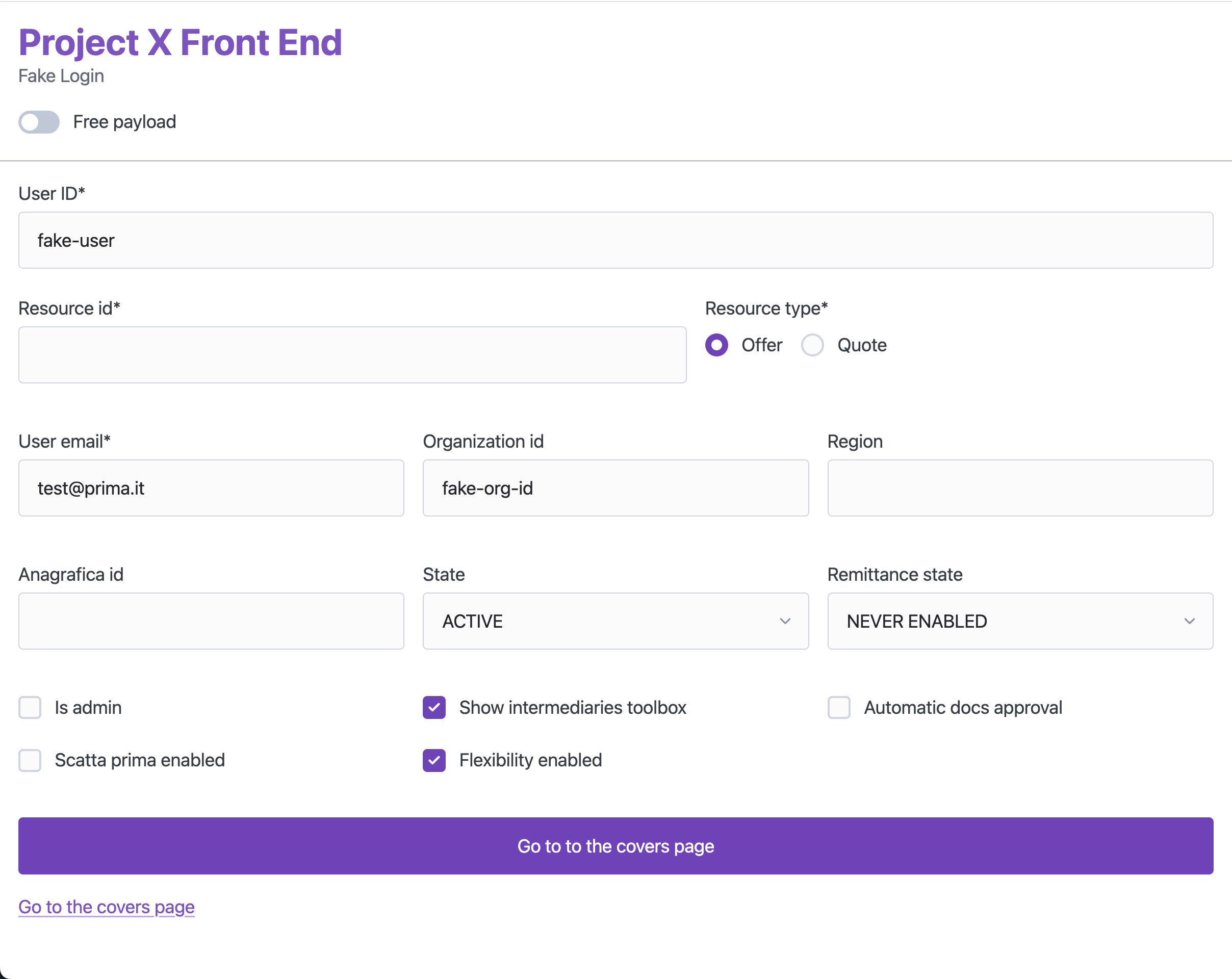
<p>To achieve a result like this, it took me just a few minutes of tweaking and around 20 lines of custom CSS:</p>

<p><img src="https://fbedussi.github.io/blog/assets/images/fake-login.png" alt="" /></p>

<p>Here’s an extract of the HTML source:</p>

<div class="language-html highlighter-rouge"><div class="highlight"><pre class="highlight"><code><span class="nt">&lt;body&gt;</span>
    <span class="nt">&lt;header&gt;</span>
        <span class="nt">&lt;hgroup&gt;</span>
            <span class="nt">&lt;h1&gt;</span>Conversion Sales Flow Front End<span class="nt">&lt;/h1&gt;</span>
            <span class="nt">&lt;p&gt;</span>Fake Login<span class="nt">&lt;/p&gt;</span>
        <span class="nt">&lt;/hgroup&gt;</span>
        <span class="nt">&lt;label&gt;</span>
            <span class="nt">&lt;input</span> <span class="na">name=</span><span class="s">"use_json"</span> <span class="na">type=</span><span class="s">"checkbox"</span> <span class="na">role=</span><span class="s">"switch"</span> <span class="nt">/&gt;</span>
            Free payload
        <span class="nt">&lt;/label&gt;</span>
    <span class="nt">&lt;/header&gt;</span>

    <span class="nt">&lt;dialog&gt;</span>
        <span class="nt">&lt;article&gt;</span>
            <span class="nt">&lt;header&gt;</span>
                <span class="nt">&lt;form</span> <span class="na">method=</span><span class="s">"dialog"</span><span class="nt">&gt;</span>
                    <span class="nt">&lt;button</span> <span class="na">aria-label=</span><span class="s">"Close"</span> <span class="na">rel=</span><span class="s">"prev"</span><span class="nt">&gt;&lt;/button&gt;</span>
                <span class="nt">&lt;/form&gt;</span>
                <span class="nt">&lt;p&gt;</span>
                    <span class="nt">&lt;strong&gt;</span>Error<span class="nt">&lt;/strong&gt;</span>
                <span class="nt">&lt;/p&gt;</span>
            <span class="nt">&lt;/header&gt;</span>
            <span class="nt">&lt;p&gt;&lt;/p&gt;</span>
        <span class="nt">&lt;/article&gt;</span>
    <span class="nt">&lt;/dialog&gt;</span>

    <span class="nt">&lt;main&gt;</span>
        <span class="nt">&lt;form&gt;</span>
            <span class="nt">&lt;fieldset&gt;</span>
                <span class="nt">&lt;label&gt;</span>
                    User ID*
                    <span class="nt">&lt;input</span> <span class="na">name=</span><span class="s">"user_id"</span> <span class="na">required</span> <span class="na">value=</span><span class="s">"fake-user"</span> <span class="nt">/&gt;</span>
                <span class="nt">&lt;/label&gt;</span>

                <span class="nt">&lt;fieldset&gt;</span>
                    <span class="nt">&lt;label&gt;</span>
                        Resource id*
                        <span class="nt">&lt;input</span> <span class="na">name=</span><span class="s">"resource_id"</span> <span class="na">required</span> <span class="nt">/&gt;</span>
                    <span class="nt">&lt;/label&gt;</span>

                    <span class="nt">&lt;fieldset&gt;</span>
                        <span class="nt">&lt;legend&gt;</span>Resource type*<span class="nt">&lt;/legend&gt;</span>
                        <span class="nt">&lt;div&gt;</span>
                            <span class="nt">&lt;label&gt;</span>
                                <span class="nt">&lt;input</span> <span class="na">type=</span><span class="s">"radio"</span> <span class="na">name=</span><span class="s">"resource_type"</span> <span class="na">value=</span><span class="s">"offer"</span> <span class="na">required</span> <span class="na">checked</span> <span class="nt">/&gt;</span>
                                Offer
                            <span class="nt">&lt;/label&gt;</span>
                            <span class="nt">&lt;label&gt;</span>
                                <span class="nt">&lt;input</span> <span class="na">type=</span><span class="s">"radio"</span> <span class="na">name=</span><span class="s">"resource_type"</span> <span class="na">value=</span><span class="s">"quote"</span> <span class="na">required</span> <span class="nt">/&gt;</span>
                                Quote
                            <span class="nt">&lt;/label&gt;</span>
                        <span class="nt">&lt;/div&gt;</span>
                    <span class="nt">&lt;/fieldset&gt;</span>
                <span class="nt">&lt;/fieldset&gt;</span>
</code></pre></div></div>

<p>I really like it—it’s clean and concise (yes, Tailwind, I’m looking at you…). It’s also very easy to modify because you don’t have to worry too much about styling. As long as you’re writing sensible HTML, the result will automatically look good and consistent. And as I mentioned, you don’t even need a CSS reset anymore.</p>

<p>So, this is definitely one more tool in my “no-stress front-end” toolbox.</p>

<p>What do you think about classless CSS frameworks? Let me know in the comments!</p>]]></content><author><name>Francesco Bedussi</name><email>francesco [at] francescobedussi.it</email></author><category term="Opinions" /><summary type="html"><![CDATA[Suppose you are building a simple page or application, maybe for internal or personal use. Suppose you don’t need anything fancy—just a good-looking form, some buttons, a headline here, and some text there. Oh, and I almost forgot—a nice modal to give feedback to the user. What will you do? Reach for a fully-fledged CSS framework like Bootstrap? (By the way, is it even used anymore?) Use a complete UI kit like Material UI? Those are clearly overkill. So what’s the alternative? Will you write all the CSS from scratch? That would be tedious. Luckily, there’s a third way: you can use a mini CSS framework—or even better, a classless one.]]></summary></entry><entry><title type="html">What I learned refactoring a medium sized Elm project</title><link href="https://fbedussi.github.io/blog//opinions/What-I-learned-refactoring-a-medium-sized-Elm-project" rel="alternate" type="text/html" title="What I learned refactoring a medium sized Elm project" /><published>2025-02-01T00:00:00+00:00</published><updated>2025-02-01T00:00:00+00:00</updated><id>https://fbedussi.github.io/blog//opinions/What%20I%20learned%20refactoring%20a%20medium%20sized%20Elm%20project</id><content type="html" xml:base="https://fbedussi.github.io/blog//opinions/What-I-learned-refactoring-a-medium-sized-Elm-project"><![CDATA[<p>Recently I’ve been busy refactoring a medium sized Elm project. The refactor was needed because the code base had grown over the years and had become very contrived and difficult to understand. That is why it was difficult to change and evolve.</p>

<p>During this activity I learned some lessons that I’d like to share. Probably not everyone will agree on every point, but let me know in the comments if you have different opinions.</p>

<!--more-->

<h2 id="1-start-a-big-refactor-only-if-you-have-a-solid-functional-test-suite">1. Start a big refactor only if you have a solid functional test suite</h2>

<p>I’ve been able to complete this big refactor only because the project had a quite comprehensive suite of functional tests, written in Cypress, and so totally independent from the implementation.</p>

<p>Unfortunately the compiler alone is not enough. No matter what someone says, “if it compiles, it works” is just not true. To successfully refactor a non trivial code base you need both: a good compiler and a good set of tests that do not depend on the implementation, so they will not break when the implementation changes. In the front end world this means tests that run in the browser against the actual page/app. Cypress, Playwright or another tool, it doesn’t matter, as long as they check that the final result is not broken.</p>

<h2 id="2-proceed-in-tiny-steps">2. Proceed in tiny steps</h2>

<p>Change one thing at a time, and make sure the code compiles and the tests pass before taking the next step. In this way it is easier to fix any error that should happen. Every time I tried to refactor “also this, since I’m already doing that” I had to roll back, and redo the job one step at a time.</p>

<h2 id="3-do-not-persist-derived-data-in-the-model">3. Do not persist derived data in the model</h2>

<p>This is dangerous because it is basically caching data, and this brings in all the cache related issues: updating and invalidating. As long as there aren’t performance issues, derived data should be computed on the fly from a unique source of truth. If and when there are performance issue solve them with the dedicated tools (https://guide.elm-lang.org/optimization/lazy.html).</p>

<p>Just by removing derived data from the model I could delete quite a lot of code and dramatically reduce the complexity of the system.</p>

<h2 id="4-avoid-useless-code">4. Avoid useless code</h2>

<p>There is some code that is just useless, like pickers that just pick a field, without any transformation, like this:</p>

<div class="language-elm highlighter-rouge"><div class="highlight"><pre class="highlight"><code><span class="n">pickText</span> <span class="p">:</span> <span class="kt">Article</span> <span class="o">-&gt;</span> <span class="kt">String</span>
<span class="n">pickText</span> <span class="p">{</span><span class="n">text</span><span class="p">}</span> <span class="o">=</span>
    <span class="n">text</span>
</code></pre></div></div>

<p>For this use case the Elm provides the field accessor function for free (<code class="language-plaintext highlighter-rouge">.text</code> in this case). True, using <code class="language-plaintext highlighter-rouge">.text</code> we are coupling the calling code with the exact name of the field, but if everything lives inside the same code base that is not a problem. If we would ever change the field name we can easily do that automatically with every editor/IDE (if the editor you are using doesn’t allow code wide rename, change it!).</p>

<p>Using the build in field accessor not only spares some lines of code, but is even mode secure, because when we write <code class="language-plaintext highlighter-rouge">.text</code> we are sure that we are actually taking the <code class="language-plaintext highlighter-rouge">text</code> field, while nothing prevents this to happen:</p>

<div class="language-elm highlighter-rouge"><div class="highlight"><pre class="highlight"><code><span class="n">pickText</span> <span class="p">:</span> <span class="kt">Article</span> <span class="o">-&gt;</span> <span class="kt">String</span>
<span class="n">pickText</span> <span class="p">{</span><span class="n">title</span><span class="p">}</span> <span class="o">=</span>
    <span class="n">title</span>
</code></pre></div></div>

<p>Pickers can be used if there is some logic in accessing the data:</p>

<div class="language-elm highlighter-rouge"><div class="highlight"><pre class="highlight"><code><span class="n">pickPrice</span> <span class="p">:</span> <span class="kt">Prices</span> <span class="o">-&gt;</span> <span class="kt">Int</span>
<span class="n">pickPrice</span> <span class="p">{</span> <span class="n">currentAmount</span><span class="o">,</span> <span class="n">baseAmount</span> <span class="p">}</span> <span class="o">=</span>
    <span class="k">if</span> <span class="n">currentAmount</span> <span class="o">&gt;</span> <span class="n">baseAmount</span> <span class="k">then</span>
        <span class="n">currentAmount</span>

    <span class="k">else</span>
        <span class="n">baseAmount</span>
</code></pre></div></div>

<p>Another type of useless code are functions that are basically just wrappers of other functions, like this:</p>

<div class="language-elm highlighter-rouge"><div class="highlight"><pre class="highlight"><code><span class="n">updatedAgentTools</span> <span class="o">=</span> <span class="n">updateInputAmount</span> <span class="n">agentTools</span> <span class="n">amountAsString</span>

<span class="n">updateInputAmount</span> <span class="n">agentTools</span> <span class="n">amountAsString</span> <span class="o">=</span>
    <span class="n">amountAsString</span>
        <span class="o">|&gt;</span> <span class="kt">String</span><span class="o">.</span><span class="n">toInt</span>  
        <span class="o">|&gt;</span> <span class="kt">Maybe</span><span class="o">.</span><span class="n">map</span> <span class="p">(</span><span class="n">updateAgentToolsInputAmount</span> <span class="n">agentTools</span><span class="p">)</span>
        <span class="o">|&gt;</span> <span class="kt">Maybe</span><span class="o">.</span><span class="n">withDefault</span> <span class="n">agentTools</span>

<span class="n">updateAgentToolsInputAmount</span> <span class="p">:</span> <span class="kt">AgentTools</span> <span class="o">-&gt;</span> <span class="kt">Int</span> <span class="o">-&gt;</span> <span class="kt">AgentTools</span>
<span class="n">updateAgentToolsInputAmount</span> <span class="n">agentTools</span> <span class="n">inputAmount</span> <span class="o">=</span>
    <span class="p">{</span> <span class="n">agentTools</span> <span class="o">|</span> <span class="n">inputAmount</span> <span class="o">=</span> <span class="n">inputAmount</span> <span class="p">}</span>
</code></pre></div></div>

<p>This was probably written in case the conversion from <code class="language-plaintext highlighter-rouge">String</code> to <code class="language-plaintext highlighter-rouge">Int</code> were needed more than once. But in the end that didn’t happen, and there was just a useless middle layer that can be removed:</p>

<div class="language-elm highlighter-rouge"><div class="highlight"><pre class="highlight"><code><span class="n">updatedAgentTools</span> <span class="o">=</span> <span class="n">amountAsString</span> 
                        <span class="o">|&gt;</span> <span class="kt">String</span><span class="o">.</span><span class="n">toInt</span>
                        <span class="o">|&gt;</span> <span class="kt">Maybe</span><span class="o">.</span><span class="n">map</span> <span class="p">(</span><span class="n">updateAgentToolsInputAmount</span> <span class="n">agentTools</span><span class="p">)</span>
                        <span class="o">|&gt;</span> <span class="kt">Maybe</span><span class="o">.</span><span class="n">withDefault</span> <span class="n">agentTools</span>    

<span class="n">updateAgentToolsInputAmount</span> <span class="p">:</span> <span class="kt">AgentTools</span> <span class="o">-&gt;</span> <span class="kt">Int</span> <span class="o">-&gt;</span> <span class="kt">AgentTools</span>
<span class="n">updateAgentToolsInputAmount</span> <span class="n">agentTools</span> <span class="n">inputAmount</span> <span class="o">=</span>
    <span class="p">{</span> <span class="n">agentTools</span> <span class="o">|</span> <span class="n">inputAmount</span> <span class="o">=</span> <span class="n">inputAmount</span> <span class="p">}</span>
</code></pre></div></div>

<p>Useless code is not only useless, but it is actually harmful, because it adds an extra level of indirection, making the code more opaque, and difficult to understand.</p>

<h2 id="5-avoid-module-aliases-as-much-as-possible">5. Avoid module aliases as much as possible</h2>

<p>Aliases are nasty because the same module ends up being used with different names in different parts of the code base. This too adds opacity to the system.</p>

<p>To resist the temptation to use aliases, it is useful to keep the module name short. If you have a module name as <code class="language-plaintext highlighter-rouge">View.RightSidebar.PriceRecap</code> it is tempting to alias it as <code class="language-plaintext highlighter-rouge">PriceRecap</code>. The problem is that maybe another dev will alias it as <code class="language-plaintext highlighter-rouge">RightPriceRecap</code> in another module, and it will be difficult to understand at a first glance if both aliases refer to the same module or not.</p>

<p>If you keep the module in the root its name will be just <code class="language-plaintext highlighter-rouge">PriceRecap</code>, so no need to alias it and no room for confusion. If you put it in the <code class="language-plaintext highlighter-rouge">RightSidebar</code> folder its name will be <code class="language-plaintext highlighter-rouge">RightSidebar.PriceRecap</code>, that is short enough to be used without aliasing. This is one of the reason why in Elm it is better to have a flatter file hierarchy than with other languages.</p>

<h2 id="6-avoid-opaque-types">6. Avoid opaque types</h2>

<p>Speaking about opacity, I see that a lot of devs love using opaque types everywhere. I think this is an anti pattern. Opaque types should be used sparingly because they add, well, opacity. There are definitely some use cases for them, but other than that they should be avoided.</p>

<p>Opaque types are basically useful in 2 cases. The first one is when we want to avoid consumer code to access the implementation detail behind a type. But this is really useful when we are writing a library that can be used by many external consumers. In that case it makes sense that we declare a clear and rigid interface that hides the internal implementation. Because we don’t want to force the consumers to change whenever we change our implementation. But this is not the case if we are just writing a module that is part of a unique code base. In that case it is not a problem to refactor the rest of the code if and when we will change the implementation of the module. It can even be done automatically by the IDE, for instance if we change a name. In this case opaque types do more harm than good, because they force you to write a lot of boilerplate, that can include bugs, and that adds another unnecessary level of indirection to the system making it more difficult to understand.</p>

<p>The second use case for opaque types is when you want to enforce particular logic in getting/setting the data, but if you don’t need to, just go with a regular type that can be used without fuss.</p>

<h2 id="7-organize-code-in-modules-by-type-and-not-by-concern">7. Organize code in modules by type, and not by concern</h2>

<p>This is the advice of the <a href="https://guide.elm-lang.org/webapps/modules">official guide</a>, but I see that a lot of devs apply patterns from other languages, for example separating the views, the model and the business logic in different files. In Elm this leads to unneeded extra complexity, a symptom of which is the necessity to export/import a lot of things. If you group all the code related to a specific type in the same module you’ll end up with a better isolation, that reduces the complexity of the system.</p>

<p>This is another reason to keep the file hierarchy flatter than with other languages, for example, instead of</p>

<div class="language-plaintext highlighter-rouge"><div class="highlight"><pre class="highlight"><code>my-app/
Main.elm
Model/
├─ Article.elm
├─ Comments.elm/
├─ Author.elm
Views/
├─ Page.elm
├─ Subviews/
│  ├─ Article.elm
│  ├─ Comment.elm
│  ├─ Avatar.elm
Helpers/
├─ Article.elm
├─ Comment.elm
├─ Author.elm
</code></pre></div></div>

<p>it is better to have just:</p>

<div class="language-plaintext highlighter-rouge"><div class="highlight"><pre class="highlight"><code>my-app/
Main.elm
Author.elm
Article.elm
Comments.elm/
</code></pre></div></div>

<p>It is not a big deal if an Elm file is quite long, 1000 lines is still fine.</p>

<h2 id="8-avoid-too-much-functional-magic">8. Avoid too much functional magic</h2>

<p>Some functional constructs can be pretty obscure for devs that are new to functional programming, so it is probably better to avoid them, if we want to make our code base more readable, even to newcomers.</p>

<p>For instance, function composition allows to save some keystrokes, but is it really worth it?</p>

<p>Is this</p>

<div class="language-elm highlighter-rouge"><div class="highlight"><pre class="highlight"><code><span class="n">isFoo</span> <span class="p">:</span> <span class="kt">MyType</span> <span class="o">-&gt;</span> <span class="kt">Bool</span>
<span class="n">isFoo</span> <span class="o">=</span>
    <span class="o">.</span><span class="n">slug</span> <span class="o">&gt;&gt;</span> <span class="kt">Slug</span><span class="o">.</span><span class="n">equal</span> <span class="kt">Slug</span><span class="o">.</span><span class="n">foo</span>
</code></pre></div></div>

<p>really better than this:</p>

<div class="language-elm highlighter-rouge"><div class="highlight"><pre class="highlight"><code><span class="n">isFoo</span> <span class="p">:</span> <span class="kt">MyType</span> <span class="o">-&gt;</span> <span class="kt">Bool</span>
<span class="n">isFoo</span> <span class="n">myType</span> <span class="o">=</span>
    <span class="n">myType</span><span class="o">.</span><span class="n">slug</span> <span class="o">|&gt;</span> <span class="kt">Slug</span><span class="o">.</span><span class="n">equal</span> <span class="kt">Slug</span><span class="o">.</span><span class="n">foo</span>
</code></pre></div></div>

<p>or even better:</p>

<div class="language-elm highlighter-rouge"><div class="highlight"><pre class="highlight"><code><span class="n">isFoo</span> <span class="p">:</span> <span class="kt">MyType</span> <span class="o">-&gt;</span> <span class="kt">Bool</span>
<span class="n">isFoo</span> <span class="n">myType</span> <span class="o">=</span>
    <span class="kt">Slug</span><span class="o">.</span><span class="n">equal</span> <span class="kt">Slug</span><span class="o">.</span><span class="n">foo</span> <span class="n">myType</span><span class="o">.</span><span class="n">slug</span>
</code></pre></div></div>

<p>Function composition is often used to avoid writing anonymous functions like in this case:</p>

<div class="language-elm highlighter-rouge"><div class="highlight"><pre class="highlight"><code><span class="kt">List</span><span class="o">.</span><span class="n">filter</span> <span class="p">(</span><span class="o">.</span><span class="n">place</span> <span class="o">&gt;&gt;</span> <span class="o">.</span><span class="n">provinceNameShort</span> <span class="o">&gt;&gt;</span> <span class="p">(</span><span class="o">==</span><span class="p">)</span> <span class="n">provinceShort</span><span class="p">)</span> <span class="n">provinces</span>
</code></pre></div></div>

<p>but isn’t it better to be a little bit more explicit and write:</p>

<div class="language-elm highlighter-rouge"><div class="highlight"><pre class="highlight"><code><span class="kt">List</span><span class="o">.</span><span class="n">filter</span> <span class="p">(</span><span class="o">\</span><span class="n">province</span> <span class="o">-&gt;</span> <span class="n">province</span><span class="o">.</span><span class="n">place</span><span class="o">.</span><span class="n">provinceNameShort</span> <span class="o">==</span> <span class="n">provinceShort</span><span class="p">)</span> <span class="n">provinces</span>
</code></pre></div></div>

<p>In the snippet above the equality operator is used as a function, this is another pattern that can be quite confusing, especially if the operator is asymmetric. If you write</p>

<div class="language-elm highlighter-rouge"><div class="highlight"><pre class="highlight"><code><span class="n">applyDiscount</span> <span class="p">:</span> <span class="kt">Int</span> <span class="o">-&gt;</span> <span class="kt">Bool</span>
<span class="n">applyDiscount</span> <span class="n">price</span> <span class="o">=</span>
    <span class="n">price</span> 
        <span class="o">|&gt;</span> <span class="p">(</span><span class="o">&lt;</span><span class="p">)</span> <span class="mi">100</span>
</code></pre></div></div>

<p>it’s not clear at a first glance if the intention was to check if price &lt; 100 or the other way around (that is what the code is actually doing). So it’s better to stick with the normal form:</p>

<div class="language-elm highlighter-rouge"><div class="highlight"><pre class="highlight"><code><span class="n">applyDiscount</span> <span class="p">:</span> <span class="kt">Int</span> <span class="o">-&gt;</span> <span class="kt">Bool</span>
<span class="n">applyDiscount</span> <span class="n">price</span> <span class="o">=</span>
    <span class="n">price</span> <span class="o">&gt;</span> <span class="mi">100</span>
</code></pre></div></div>

<p>To avoid anonymous function sometimes we need to use the <code class="language-plaintext highlighter-rouge">flip</code> function, that, as the name suggests, inverts the order of the parameters of a function.</p>

<p>What’s really happening here?</p>

<div class="language-elm highlighter-rouge"><div class="highlight"><pre class="highlight"><code><span class="n">joinMessageParticlesContent</span> <span class="p">:</span> <span class="kt">List</span> <span class="p">(</span><span class="kt">MessageParticle</span> <span class="kt">Msg</span><span class="p">)</span> <span class="o">-&gt;</span> <span class="kt">List</span> <span class="p">(</span><span class="kt">Html</span> <span class="kt">Msg</span><span class="p">)</span>
<span class="n">joinMessageParticlesContent</span> <span class="o">=</span>
    <span class="kt">List</span><span class="o">.</span><span class="n">concatMap</span> <span class="p">(</span><span class="n">flip</span> <span class="kt">List</span><span class="o">.</span><span class="n">append</span> <span class="p">[</span> <span class="kt">Html</span><span class="o">.</span><span class="n">br</span> <span class="p">[]</span> <span class="p">[]</span> <span class="p">]</span> <span class="o">&lt;&lt;</span> <span class="o">.</span><span class="n">content</span><span class="p">)</span>
</code></pre></div></div>

<p>this:</p>
<div class="language-elm highlighter-rouge"><div class="highlight"><pre class="highlight"><code><span class="n">joinMessageParticlesContent</span> <span class="p">:</span> <span class="kt">List</span> <span class="p">(</span><span class="kt">MessageParticle</span> <span class="kt">Msg</span><span class="p">)</span> <span class="o">-&gt;</span> <span class="kt">List</span> <span class="p">(</span><span class="kt">Html</span> <span class="kt">Msg</span><span class="p">)</span>
<span class="n">joinMessageParticlesContent</span> <span class="n">messageParticles</span> <span class="o">=</span>
    <span class="n">messageParticles</span> <span class="o">|&gt;</span> <span class="kt">List</span><span class="o">.</span><span class="n">concatMap</span> <span class="p">(</span><span class="o">\</span><span class="n">messageParticle</span> <span class="o">-&gt;</span> <span class="n">messageParticle</span><span class="o">.</span><span class="n">content</span> <span class="o">++</span> <span class="p">[</span> <span class="n">br</span> <span class="p">[]</span> <span class="p">[]</span> <span class="p">]</span> <span class="p">)</span>
</code></pre></div></div>

<p>It is not a case that the <code class="language-plaintext highlighter-rouge">flip</code> function has been removed from the language core.</p>

<h2 id="9-strive-for-simplicity">9. Strive for simplicity</h2>

<p>If a code base is simple, it is easy for every dev to understand it and to change it. Simple code can remain simple iteration after iteration, because if a dev truly understands the code they can refactor their work with confidence, and to get to a simple solution do you need some cycles of refactoring from the initial implementation.</p>

<p>If a code base is complex, it can only become more complex as time goes by, because once a poor dev has found a working implementation of the feature they are working on, they will not dare to refactor it to make it better, for the fear of breaking everything.</p>

<p>The biggest enemies of simplicity are premature optimization and premature abstractions. Stick with the easiest solution as long as you don’t actually need something more complex. Let’s repeat the same code some times before trying to abstract it into a common implementation.</p>

<h2 id="10-dont-overcomplicate-things-just-because-someone-says-that-this-is-the-right-way">10. Don’t overcomplicate things just because someone says that “this is the right way”</h2>

<p>For instance, you don’t need to add a tenth point to a list just because copywriting rules say that a decalogue is a compelling format!</p>]]></content><author><name>Francesco Bedussi</name><email>francesco [at] francescobedussi.it</email></author><category term="Opinions" /><summary type="html"><![CDATA[Recently I’ve been busy refactoring a medium sized Elm project. The refactor was needed because the code base had grown over the years and had become very contrived and difficult to understand. That is why it was difficult to change and evolve. During this activity I learned some lessons that I’d like to share. Probably not everyone will agree on every point, but let me know in the comments if you have different opinions.]]></summary></entry><entry><title type="html">The pros and cons of Elm as a Front End language</title><link href="https://fbedussi.github.io/blog//opinions/The-pros-and-cons-of-Elm-as-a-Front-End-language" rel="alternate" type="text/html" title="The pros and cons of Elm as a Front End language" /><published>2024-08-09T00:00:00+00:00</published><updated>2024-08-09T00:00:00+00:00</updated><id>https://fbedussi.github.io/blog//opinions/The%20pros%20and%20cons%20of%20Elm%20as%20a%20Front%20End%20language</id><content type="html" xml:base="https://fbedussi.github.io/blog//opinions/The-pros-and-cons-of-Elm-as-a-Front-End-language"><![CDATA[<p>Everybody knows that there are a lot of JavaScript Front End frameworks. Their number is so hight, in fact, that it is one of the main sources of the so called JavaScript fatigue.</p>

<p>But not everybody knows that it is possible to build web sites, single page applications and web interfaces in general even without writing a single line of JavaScript. And I’m not talking about a simple static HTML and CSS web page, but about a rich, interactive application.</p>

<p>There are some alternatives to JS, one of them is the C# based <a href="https://dotnet.microsoft.com/en-us/apps/aspnet/web-apps/blazor">Blazor</a>, by Microsoft.</p>

<p>But the one I will focus on in this post is <a href="https://elm-lang.org/">Elm</a>. Elm is a Domain Specific Language to build web interfaces. It is a purely functional language and its main selling proposition is that it prevents runtime exceptions. It has a lot of nice features and some downsides. Let’s take a closer look both at pros and at cons.</p>

<!--more-->

<h2 id="pros-of-using-the-elm-language-for-the-front-end-development">Pros of using the Elm language for the Front End development</h2>

<h3 id="no-runtime-exceptions">No runtime exceptions</h3>

<p>As I said, one of the Elm main benefits is to make it almost impossible to get runtime exceptions in production. This is basically due to its strong and static type system, enforced by the compiler.</p>

<p>Of course, nowadays you can get a static type system also in the JSLand using TypeScript. But with TypeScript there are various escape latches: you can turn off the <code class="language-plaintext highlighter-rouge">strict</code> compiler option, you can use the <code class="language-plaintext highlighter-rouge">any</code> wildcard, and even if you are disciplined enough to avoid these shortcuts, errors can sneak in with values coming from the outside, for instance with responses to HTTP calls. To prevent this from happening you need to use one more tool: a data validator such as <a href="https://zod.dev/">Zod</a>. And be even more disciplined to always use it for all the incoming data.</p>

<h3 id="batteries-included">Batteries included</h3>

<p>So, a second benefit of using Elm is that it replaces a lot of different tools. Not only JavaScript, TypeScript and a validation library, but also:</p>

<ul>
  <li>A templating language (like <a href="https://handlebarsjs.com/">handlebars</a>) or a view library (like <a href="https://react.dev/">React</a>). Using plain Elm functions it is possible to write declarative, safe, data driven, HTML</li>
  <li>A client side routing library, like <a href="https://reactrouter.com/">React Router</a>. Elm has it own system to handle client side routing</li>
  <li>A state manager like <a href="https://redux.js.org/">Redux</a>. Elm has its own architecture to handle the global state. It is called <a href="https://guide.elm-lang.org/architecture/">TEA (The Elm Architecture)</a>, and actually Redux was partially based on it</li>
  <li>A way to manage the page title (with React you need an extra library, like <a href="https://www.npmjs.com/package/react-helmet">Helmet</a> to do that)</li>
  <li>A testing library like <a href="https://jestjs.io/">Jest</a>. <a href="https://package.elm-lang.org/packages/elm-explorations/test/latest">Elm has it own testing library</a> that is part of the core feature, even if the experimental one. Elm test supports also <a href="https://elmprogramming.com/fuzz-testing.html">fuzzy tests</a>, tests that are automatically repeated dozen of times using randomly generated values, with a preference for corner case values, that are more likely to produce bugs: empty strings, strings with weird symbols, zeroes, ecc.</li>
</ul>

<p>The tool chain is also much simpler than the typical JS based one. The Elm compiler takes care of building, bundling and optimizing the code. So there is no need to deal with the intricacies of the Webpack or Vite configuration.</p>

<p>Then, of course, Elm is a purely functional language, with built-in data immutability. So it replaces also:</p>
<ul>
  <li>a functional library, like <a href="https://ramdajs.com/">Ramda</a> or <a href="https://gcanti.github.io/fp-ts/">fp-ts</a></li>
  <li>an immutability library, like <a href="https://immutable-js.com/">immutable.js</a></li>
</ul>

<h3 id="opinionated">Opinionated</h3>

<p>The Elm ecosystem is much simpler than the JS one, and for features that are not strictly part of the language core there is generally only one option, or a small set of options:</p>

<ul>
  <li>There is one formatter, <a href="https://github.com/avh4/elm-format">Elm-format</a>, that cannot be configured, it always formats Elm source code according to a standard set of rules based on the <a href="https://elm-lang.org/docs/style-guide">official Elm Style Guide</a></li>
  <li>There are a couple of linters: <a href="https://github.com/stil4m/elm-analyse">Elm-analyse</a> and <a href="https://package.elm-lang.org/packages/jfmengels/elm-review/latest">Elm-review</a></li>
  <li>There is one official <a href="https://marketplace.visualstudio.com/items?itemName=Elmtooling.elm-ls-vscode">VS Code plugin</a></li>
</ul>

<p>The Elm compiler also enforces some naming rules:</p>
<ul>
  <li>File names must be PascalCase and cannot contain dots</li>
  <li>Module names must match their file name, so module Parser.Utils needs to be in file Parser/Utils.elm</li>
</ul>

<h3 id="performance">Performance</h3>

<p>The compiled Elm code is by default <a href="https://elm-lang.org/news/blazing-fast-html-round-two">quite fast</a>, and <a href="https://elm-lang.org/news/small-assets-without-the-headache">small</a>.</p>

<h3 id="semantic-versioning">Semantic versioning</h3>

<p>Thanks to its types system, Elm can enforce a strict semantic versioning for its packages, this prevents all the errors that can happen in JavaScript when updating the dependencies.</p>

<h3 id="very-stable">Very stable</h3>

<p>Elm is a very stable language that evolves very, very, slowly. It is almost frozen, compared to JS and its ecosystem. The last language release (19.1) was back in 2019. So, yes, to use it you must learn something new, but then this knowledge is capitalized.</p>

<h3 id="interoperable-with-javascript">Interoperable with JavaScript</h3>

<p>Elm is interoperable with JavaScript thanks to a dedicated message system. This allows you to use all the JS features that do not have an Elm version: like the local storage or the web sockets.</p>

<h2 id="cons-of-using-the-elm-language-for-the-front-end-development">Cons of using the Elm language for the Front End development</h2>

<p>As always, life is not a bed of roses, and Elm has also some pain points:</p>
<ul>
  <li>Currently it does not support server side rendering</li>
  <li>It cannot use all the advanced browser APIs, like the indexed DB, the view transition API, and so on. Sure, they can be used via JS, but this adds an extra layer of complexity</li>
  <li>There is not a CSS in Elm solution that uses regular CSS syntax, like <a href="https://styled-components.com/">Styled Components</a> does. There is <a href="https://github.com/rtfeldman/elm-css">Elm css</a>, but it is a complete rewrite of the CSS spec with the Elm syntax. Sure it offers all the Elm guaranties, but, hey, I already know CSS, and I don’t feel any need to learn a new syntax. Even because CSS is a fault tolerant language that cannot generate blocking runtime errors</li>
  <li>The type system is less powerful and flexible than the TypeScript one (for instance there is no <code class="language-plaintext highlighter-rouge">Partial</code>, <code class="language-plaintext highlighter-rouge">Pick</code> or <code class="language-plaintext highlighter-rouge">Omit</code>)</li>
  <li>The ecosystem is very limited, compared to the JS one</li>
  <li>It is not possible to use the dev tools to inspect and debug the source code</li>
</ul>

<p>Beside these technical issues, one thing to consider, if you are planning of using Elm at work, is also that in a team it is more difficult to hire people that knows Elm, or that are open to learn it.</p>

<h2 id="conclusion">Conclusion</h2>

<p>Even with all its limits Elm can be a breath of fresh air, especially if you fall in one or both of these categories:</p>
<ul>
  <li>You like functional programming</li>
  <li>You are suffering some form of JavaScript fatigue</li>
</ul>

<p>Because Elm is quite the opposite of JS. If JS is constantly changing and evolving, Elm is almost frozen. If everything can be done in JS in dozens of different ways, in Elm there is usually only one right or preferred way of doing things. If JS projects require a complex stack of tools and libraries, Elm requires only a limited number of dependencies.</p>

<p>So, give it a try and let me know in the comments your opinions.</p>]]></content><author><name>Francesco Bedussi</name><email>francesco [at] francescobedussi.it</email></author><category term="Opinions" /><summary type="html"><![CDATA[Everybody knows that there are a lot of JavaScript Front End frameworks. Their number is so hight, in fact, that it is one of the main sources of the so called JavaScript fatigue. But not everybody knows that it is possible to build web sites, single page applications and web interfaces in general even without writing a single line of JavaScript. And I’m not talking about a simple static HTML and CSS web page, but about a rich, interactive application. There are some alternatives to JS, one of them is the C# based Blazor, by Microsoft. But the one I will focus on in this post is Elm. Elm is a Domain Specific Language to build web interfaces. It is a purely functional language and its main selling proposition is that it prevents runtime exceptions. It has a lot of nice features and some downsides. Let’s take a closer look both at pros and at cons.]]></summary></entry></feed>